Reference GuideAug 9, 20261 min read
What Shortcuts Does the Mac Excel Shortcuts app Cover?
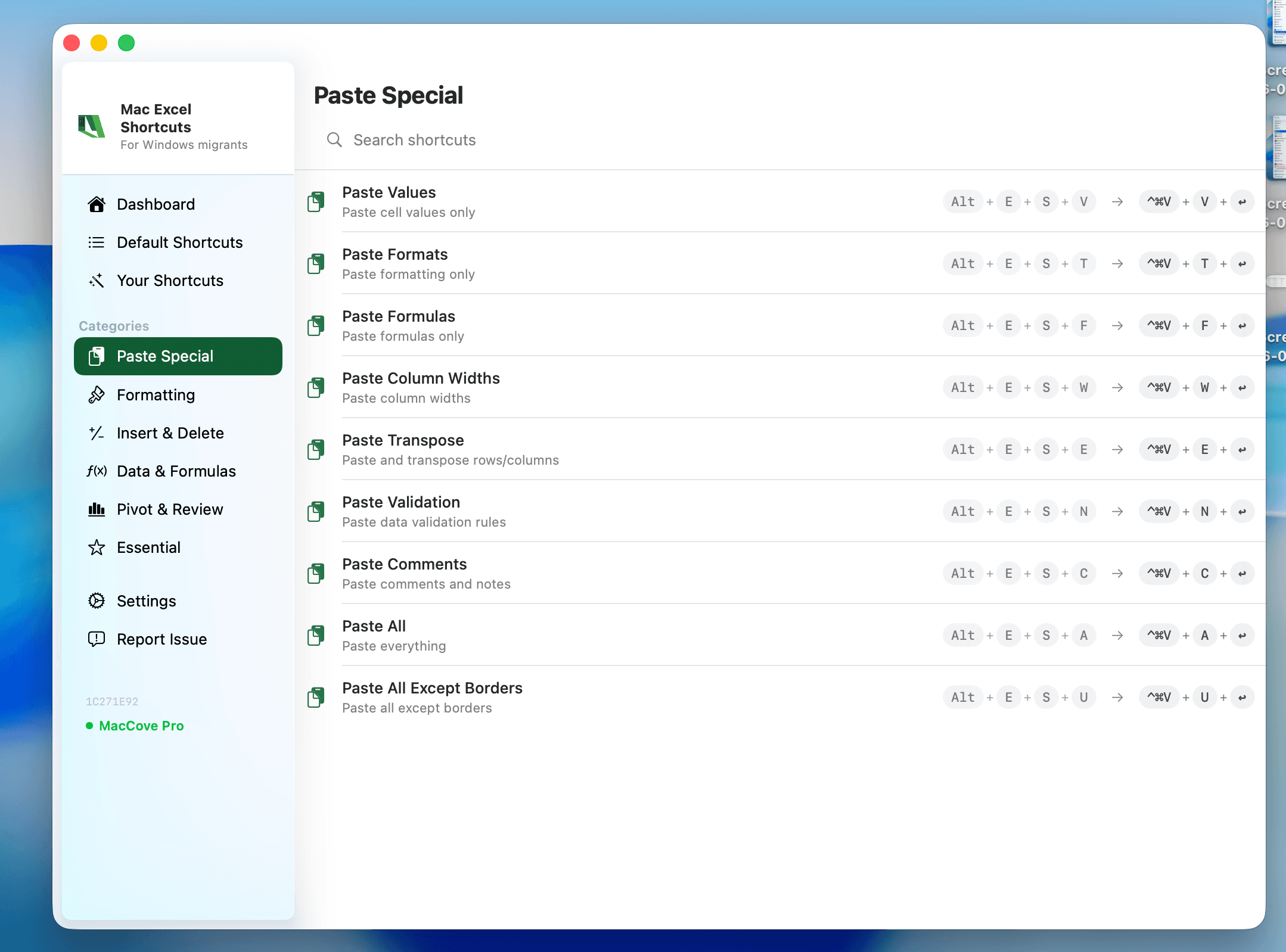
Quick Answer: Mac Excel Shortcuts app currently covers 58 confirmed shortcuts across Paste Special, borders, alignment, merging, rows/columns, filtering, and more — organized by category in the tables below. Every entry here has been tested and verified working; anything still in QA is left off this list until it's confirmed. That includes Remove Duplicates (Alt, A, M), which has no native Mac Excel shortcut at all and only works through Mac Excel Shortcuts app.
Mac Excel Shortcuts app works by recognizing the old Windows-style key sequence you already know — the same Ribbon Access Key chains from Alt, H, Alt, E, and Alt, A — and firing the correct Mac-native action for it, since macOS Excel has no Ribbon Access Key system of its own. Type the sequence below (don't hold the keys together, tap them one after another the way you would Ribbon Access Keys on Windows) and Mac Excel Shortcuts does the rest.
This list reflects what's verified working today. Mac Excel Shortcuts app is actively adding coverage — if a shortcut you rely on isn't here yet, it's either in testing or on the roadmap, not intentionally excluded.
Paste Special
Type the classic Excel Paste Special accelerator (the letter after Alt, E, S) and Mac Excel Shortcuts runs the matching Mac paste action directly — no Paste Special dialog required.
| Type this (old Windows shortcut) | What it does on Mac |
| Alt, E, S, V | Paste Values Only |
| Alt, E, S, T | Paste Formats Only |
| Alt, E, S, F | Paste Formulas Only |
| Alt, E, S, W | Paste Column Widths |
| Alt, E, S, E | Paste All Except Borders |
| Alt, E, S, N | Paste with Data Validation |
| Alt, E, S, C | Paste Comments / Notes |
| Alt, E, S, A | Paste All |
| Alt, E, S, U | Paste Formulas and Number Formats |
Column Width and Row Height
| Type this (old Windows shortcut) | What it does on Mac |
| Alt, H, O, I | AutoFit Column Width |
| Alt, H, O, A | AutoFit Row Height |
| Alt, H, O, W | Set Column Width |
| Alt, H, O, H | Hide & Unhide (rows, columns, or sheet) |
Borders
| Type this (old Windows shortcut) | What it does on Mac |
| Alt, H, B, A | All Borders |
| Alt, H, B, N | No Border |
| Alt, H, B, O | Outside Borders |
Font
| Type this (old Windows shortcut) | What it does on Mac |
| Alt, H, F, C | Font Color |
| Alt, H, F, G | Increase Font Size |
| Alt, H, F, K | Decrease Font Size |
| Alt, H, 1 | Bold |
| Alt, H, 2 | Italic |
| Alt, H, 4 | Underline |
Alignment and Merge
| Type this (old Windows shortcut) | What it does on Mac |
| Alt, H, A, C | Align Center |
| Alt, H, A, L | Align Left |
| Alt, H, A, R | Align Right |
| Alt, H, A, T | Align Top |
| Alt, H, A, M | Align Middle |
| Alt, H, A, B | Align Bottom |
| Alt, H, W | Wrap Text |
| Alt, H, M, C | Merge & Center |
| Alt, H, M, A | Merge Across |
| Alt, H, M, M | Merge Cells |
| Alt, H, M, U | Unmerge Cells |
Number Format
| Type this (old Windows shortcut) | What it does on Mac |
| Alt, H, K | Currency Format |
| Alt, H, L | Percent Style |
Rows and Columns
| Type this (old Windows shortcut) | What it does on Mac |
| Alt, H, I, R | Insert Sheet Rows |
| Alt, H, I, C | Insert Sheet Columns |
| Alt, H, D, R | Delete Sheet Rows |
| Alt, H, D, C | Delete Sheet Columns |
Filtering, Sorting, and Duplicates
This is the category that closes the biggest native gap — AutoFilter’s own toggle already works on Mac, but Remove Duplicates and Advanced Filter have no menu-free path until Mac Excel Shortcuts app adds one.
| Type this (old Windows shortcut) | What it does on Mac |
| Ctrl+Shift+L | Toggle AutoFilter on/off for the selected range |
| Alt, A, S, A | Sort A to Z |
| Alt, A, S, D | Sort Z to A |
| Alt, A, Q | Advanced Filter |
| Alt, A, M | Remove Duplicates |
Data Tools
| Type this (old Windows shortcut) | What it does on Mac |
| Alt, M, S | Name Manager |
| Alt, M, M | Define Name |
| Alt, A, V, V | Data Validation |
| Alt, A, E | Text to Columns |
Protection
| Type this (old Windows shortcut) | What it does on Mac |
| Alt, R, S | Protect Sheet |
| Alt, R, P | Protect Workbook |
View and Window
| Type this (old Windows shortcut) | What it does on Mac |
| Alt, W, F, F | Freeze / Unfreeze Panes |
| Alt, W, R | Freeze Top Row |
| Alt, W, C | Freeze First Column |
| Alt, W, H | Hide Workbook Window |
| Alt, W, U | Unhide Workbook Window |
| Alt, W, V, G | Toggle Gridlines |
Sheet Navigation
| Shortcut | What it does |
| Option + Right Arrow | Go to next sheet |
| Option + Left Arrow | Go to previous sheet |
Related guides
← Back to all articles