Free PDF download

Printable Mac Excel Shortcuts Cheat Sheet

Every Windows Excel shortcut next to what you press on your Mac. Download it as a clean PDF, or print the keyboard layout and stick it right on your MacBook.

  • Free
  • No install
  • Files deleted after conversion

How It Works

Three steps, under a minute.

2
Download the PDF
One click. Sign in with Google to get the file. It is free.
3
Print it at 100%
Letter or A4. Sticker paper works well for the keyboard layout.

A cheat sheet made for Mac keyboards

Two columns

put Windows Excel next to the Mac. Every shortcut you know from Windows on the left, and what you actually press on your Mac on the right

without the guesswork.

Side by side
⌥ = Alt

is the one rule to remember. On a Mac, Option takes the place of Alt, so Alt H V V becomes ⌥ H V V. The sheet writes every sequence out for you,

ready to copy.

How to read it
1:1

is the scale of the keyboard layout. Print it at 100% and each key lines up with your MacBook, so the right letter is

always under your finger.

Keyboard layout
Print

it, stick it on, or keep it beside your screen. Letter or A4, clean light colours, and a page that

just works on paper.

Free PDF
Printable Excel shortcuts cheat sheet, page layoutMac keyboard layout cheat sheet for Excel shortcuts
See the sheet before you download it
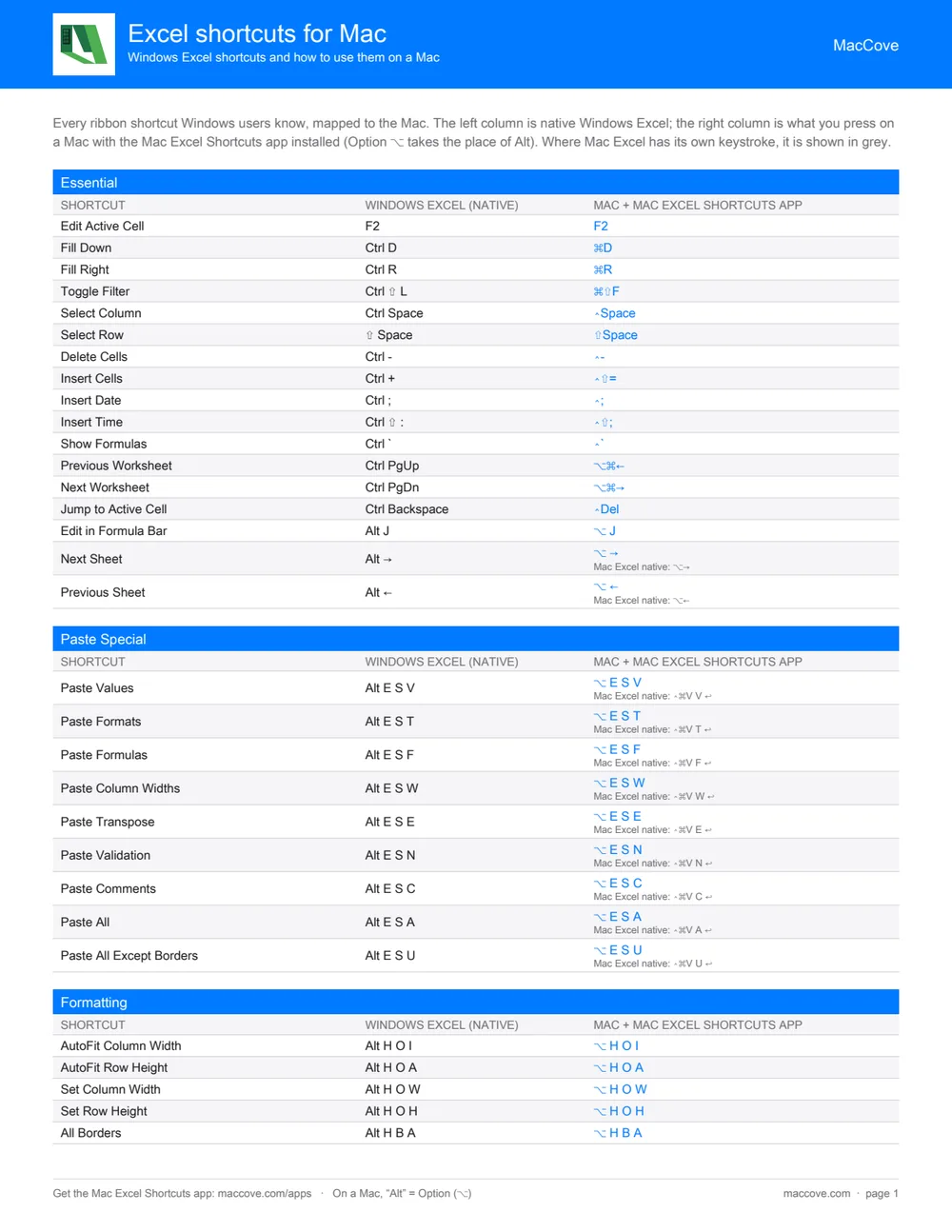
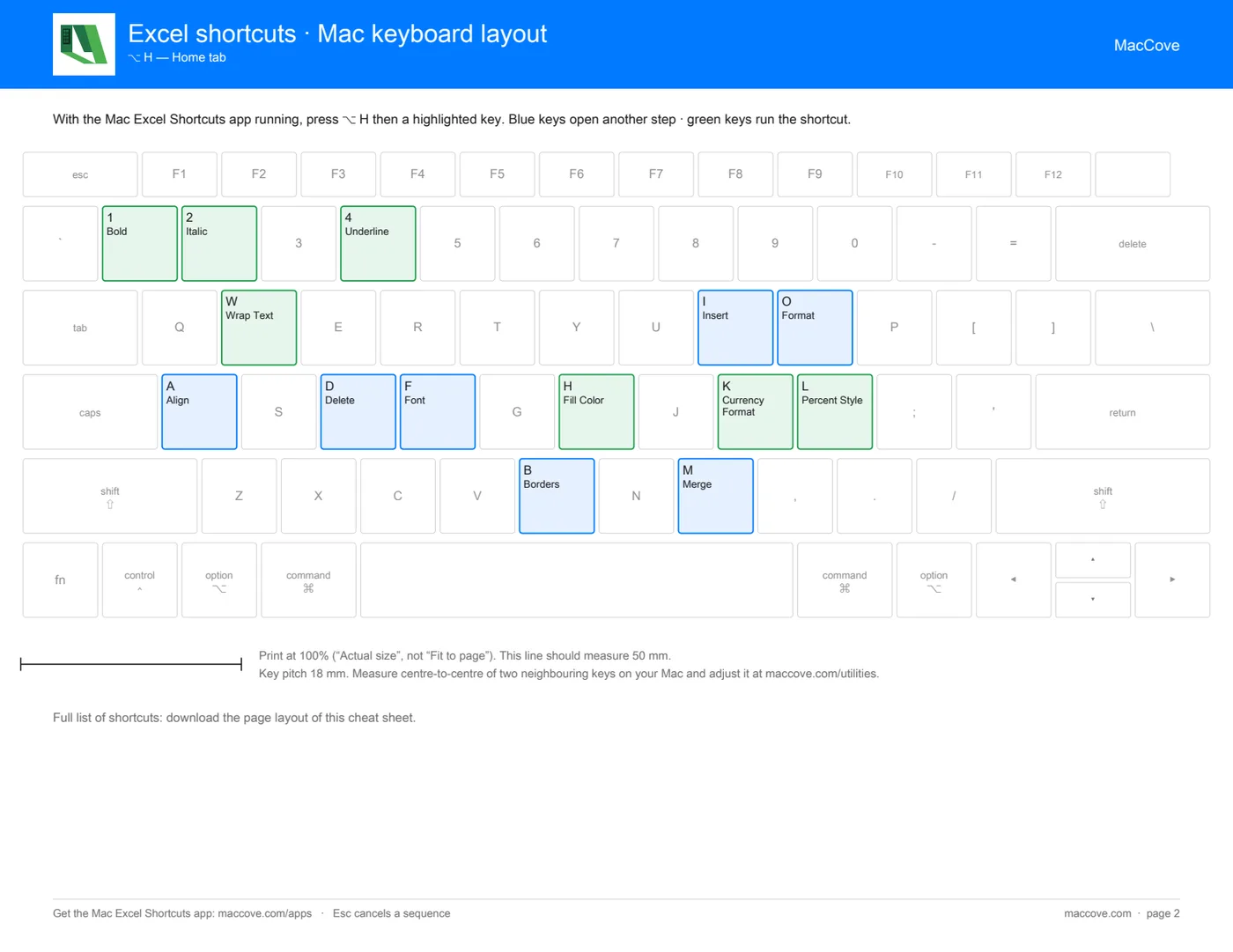
The page layout lists every shortcut by ribbon tab. The keyboard layout shows one step of an Alt sequence per sheet, so a letter on your keyboard leads you to the next.
Windows and Mac columns, grouped by ribbon tab
A MacBook keyboard drawn at real key size
Letter and A4 paper
Native Mac shortcuts shown where Excel has one
Get the cheat sheet

What's on the cheat sheet

91 Excel shortcuts. Windows on the left; on a Mac with the Mac Excel Shortcuts app, Option (⌥) takes the place of Alt.

Essential
ShortcutWindows Excel (native)Mac + Mac Excel Shortcuts app
Edit Active CellF2F2
Fill DownCtrl D⌘D
Fill RightCtrl R⌘R
Toggle FilterCtrl ⇧ L⌘⇧F
Select ColumnCtrl Space⌃Space
Select Row⇧ Space⇧Space
Delete CellsCtrl -⌃-
Insert CellsCtrl +⌃⇧=
Insert DateCtrl ;⌃;
Insert TimeCtrl ⇧ :⌃⇧;
Show FormulasCtrl `⌃`
Previous WorksheetCtrl PgUp⌥⌘←
Next WorksheetCtrl PgDn⌥⌘→
Jump to Active CellCtrl Backspace⌃Del
Edit in Formula BarAlt J⌥ J
Next SheetAlt →⌥ →
Previous SheetAlt ←⌥ ←
Paste Special
ShortcutWindows Excel (native)Mac + Mac Excel Shortcuts app
Paste ValuesAlt E S V⌥ E S V
Paste FormatsAlt E S T⌥ E S T
Paste FormulasAlt E S F⌥ E S F
Paste Column WidthsAlt E S W⌥ E S W
Paste TransposeAlt E S E⌥ E S E
Paste ValidationAlt E S N⌥ E S N
Paste CommentsAlt E S C⌥ E S C
Paste AllAlt E S A⌥ E S A
Paste All Except BordersAlt E S U⌥ E S U
Formatting
ShortcutWindows Excel (native)Mac + Mac Excel Shortcuts app
AutoFit Column WidthAlt H O I⌥ H O I
AutoFit Row HeightAlt H O A⌥ H O A
Set Column WidthAlt H O W⌥ H O W
Set Row HeightAlt H O H⌥ H O H
All BordersAlt H B A⌥ H B A
No BordersAlt H B N⌥ H B N
Outside BordersAlt H B O⌥ H B O
Bottom BorderAlt H B B⌥ H B B
Fill ColorAlt H H⌥ H H
Font ColorAlt H F C⌥ H F C
Center AlignAlt H A C⌥ H A C
Left AlignAlt H A L⌥ H A L
Right AlignAlt H A R⌥ H A R
Wrap TextAlt H W⌥ H W
Merge & CenterAlt H M C⌥ H M C
Top BorderAlt H B T⌥ H B T
Left BorderAlt H B L⌥ H B L
Right BorderAlt H B R⌥ H B R
BoldAlt H 1⌥ H 1
ItalicAlt H 2⌥ H 2
UnderlineAlt H 4⌥ H 4
Increase Font SizeAlt H F G⌥ H F G
Decrease Font SizeAlt H F K⌥ H F K
Top AlignAlt H A T⌥ H A T
Middle AlignAlt H A M⌥ H A M
Bottom AlignAlt H A B⌥ H A B
Merge AcrossAlt H M A⌥ H M A
Merge CellsAlt H M M⌥ H M M
Unmerge CellsAlt H M U⌥ H M U
Currency FormatAlt H K⌥ H K
Percent StyleAlt H L⌥ H L
Insert & Delete
ShortcutWindows Excel (native)Mac + Mac Excel Shortcuts app
Insert RowAlt H I R⌥ H I R
Insert ColumnAlt H I C⌥ H I C
Delete RowAlt H D R⌥ H D R
Delete ColumnAlt H D C⌥ H D C
Unhide ColumnAlt H O C A⌥ H O C A
Unhide RowAlt H O U L⌥ H O U L
Data
ShortcutWindows Excel (native)Mac + Mac Excel Shortcuts app
Toggle FilterAlt A T⌥ A T
Sort A→ZAlt A S A⌥ A S A
Sort Z→AAlt A S D⌥ A S D
Remove DuplicatesAlt A M⌥ A M
Clear FilterAlt A C⌥ A C
Select Filter OptionSpaceSpace
Data Tools
ShortcutWindows Excel (native)Mac + Mac Excel Shortcuts app
Data ValidationAlt A V V⌥ A V V
Text to ColumnsAlt A E⌥ A E
Advanced FilterAlt A Q⌥ A Q
Refresh AllAlt A R A⌥ A R A
Formulas
ShortcutWindows Excel (native)Mac + Mac Excel Shortcuts app
Name ManagerAlt M S⌥ M S
Define NameAlt M M⌥ M M
Trace DependentsAlt M D⌥ M D
Trace PrecedentsAlt M P⌥ M P
Calculate WorkbookAlt M A A⌥ M A A
Calculate SheetAlt M A C⌥ M A C
Pivot Table
ShortcutWindows Excel (native)Mac + Mac Excel Shortcuts app
Insert PivotTableAlt N V⌥ N V
Refresh PivotAlt J T R⌥ J T R
Pivot OptionsAlt J T O⌥ J T O
Review
ShortcutWindows Excel (native)Mac + Mac Excel Shortcuts app
Spell CheckAlt R S⌥ R S
Protect SheetAlt R P⌥ R P
Unprotect SheetAlt R U⌥ R U
View
ShortcutWindows Excel (native)Mac + Mac Excel Shortcuts app
Freeze PanesAlt W F F⌥ W F F
Freeze Top RowAlt W R⌥ W R
Freeze First ColumnAlt W C⌥ W C
Hide WindowAlt W H⌥ W H
Unhide WindowAlt W U⌥ W U
GridlinesAlt W V G⌥ W V G

Private by design

Your files are yours. We convert them and let them go.

Deleted after conversion
Your upload is processed in memory or a temporary folder. We do not keep or read your files, and the converted file is deleted after you download it.
Free to use
No watermarks and no limits on how good the result looks. Signing in with Google is only needed to download.
Built by the Mac Excel Shortcuts team
MacCove makes Mac apps for people who live in Excel. These utilities come from the same team, with the same privacy standards.

Questions & Answers

About excel shortcuts cheat sheet.

Yes. The PDF is free. You sign in with Google when you download, and agree to receive Mac Excel tips by email, which you can stop at any time.
The page layout is a two-column reference: the Windows shortcut and what you press on a Mac with the Mac Excel Shortcuts app. The keyboard layout draws a MacBook keyboard at real key size and labels the keys for each step of an Excel Alt sequence, so you can print it and stick it to your keyboard.
On a Mac the Option key (⌥) takes the place of Alt. With the Mac Excel Shortcuts app running, pressing Option then H, V, V pastes values just like Alt, H, V, V does on Windows.
Mac Excel has its own native shortcuts for some actions, and the cheat sheet shows them in grey where they exist. Most Windows ribbon shortcuts (Alt H, Alt E S and so on) do not exist natively on a Mac, which is what the Mac Excel Shortcuts app adds.
Print at 100% (Actual size), not Fit to page. A 50 mm ruler is printed on the sheet so you can check it. If your keys are a different size, measure the distance between the centres of two neighbouring keys and adjust the key pitch.