Available for Mac OS

Paste Special
Shortcuts on Mac

Alt+E+S+V for Paste Special. Alt+E+S+T for formats only. The Windows Excel paste shortcuts you already know, running natively on your Mac — no menus, no relearning.
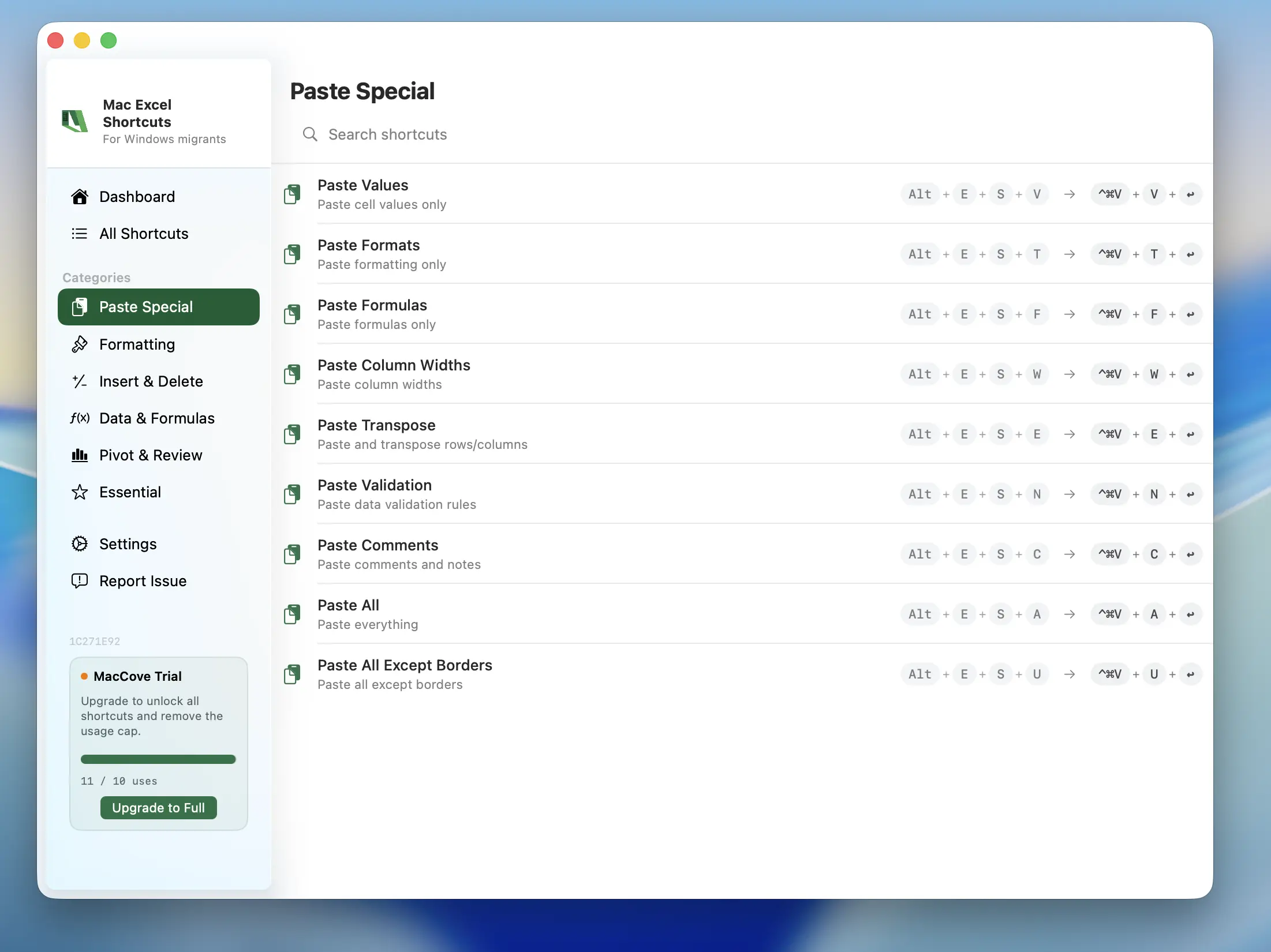
Paste Special shortcuts in Mac Excel Shortcuts

Every Paste Shortcut, Working on Mac

The exact key combinations from Windows Excel, now native on macOS.

Alt+E+S+V
Paste Values
Paste only the values from a copied cell, dropping formulas and formatting.
Alt+E+S+T
Paste Formats
Paste only the formatting from the copied cell, leaving its values and formulas untouched.
Alt+E+S+F
Paste Formulas
Paste only the formula from the copied cell, recalculated for the new location.
Alt+E+S+W
Paste Column Widths
Match the column width of the source cells without changing any content.
Alt+E+S+M
Paste and Add
Add the copied values to the existing values in the destination cells.
+V
Standard Paste
Regular paste still works exactly as expected — nothing changes for your normal workflow.

Get Paste Special Working in Under a Minute

No configuration, no remapping keyboard layouts by hand.

1
Download the App
Download the DMG directly. Installation takes seconds and requires zero setup.
2
Provide Permissions
Grant Accessibility and Input Monitoring so your keyboard shortcuts can reach Excel.
3
Open Excel and Paste
Open Excel and use Alt+E+S+V exactly like you would on Windows.

Questions & Answers

Everything you need to know about running Paste Special shortcuts on your Mac.

Mac Excel Shortcuts is available on macOS 14.0+ (Sonoma and above).
Yes — MacCove is free to download and use for up to trial usage limits or 7 days. For unlimited shortcuts, advanced actions, cloud sync, and team sharing, upgrade to for $4.99/month or $49.99/lifetime.
No, each license covers only one Mac for now.
Yes — all shortcuts run locally on your device upto 24 hours in trial period and 7 days post upgrade. They don't require an internet connection as part of our local-first architecture.
We do not collect any data.
Yes — Refer two people to Mac Excel Shortcuts, and get 50% on your upgrade.