macOS Versions in Order: Every Release From Big Sur to Golden Gate
macOS versions in order, newest first
Seven recent macOS versions are listed here, newest first, with release date, Apple's latest version number and the oldest Macs Apple lists for each. macOS 27 Golden Gate is the newest.
| macOS | Name | Released | Latest version (Apple, Oct 26, 2026) | Oldest Macs on Apple's list |
|---|---|---|---|---|
| 27 | Golden Gate | Sep 14, 2026 | 27.2 | MacBook Pro 13-inch (M1, 2020), MacBook Air (M1, 2020), Mac mini (M1, 2020) |
| 26 | Tahoe | Sep 15, 2025 | 26.7.2 | MacBook Pro 16-inch (2019), Mac Pro (2019) |
| 15 | Sequoia | Sep 16, 2024 | 15.8.2 | MacBook Pro 15-inch (2018), Mac mini (2018), iMac Pro (2017) |
| 14 | Sonoma | Sep 26, 2023 | 14.8.9 | MacBook Pro (2018), MacBook Air (Retina, 2018), iMac Pro (2017) |
| 13 | Ventura | Oct 24, 2022 | 13.7.8 | MacBook Pro (2017), MacBook (Retina, 12-inch, 2017), iMac (2017) |
| 12 | Monterey | Oct 25, 2021 | 12.7.6 | MacBook Pro (Early 2015), MacBook Air (Early 2015), Mac mini (Late 2014), Mac Pro (Late 2013) |
| 11 | Big Sur | Nov 12, 2020 (secondary source) | 11.7.11 | MacBook Pro (Late 2013), MacBook Air (Mid 2013), Mac Pro (Late 2013) |
Release dates for Monterey through macOS 26 come from Apple Newsroom announcements, and the macOS 27 date comes from Apple's compatibility page, dated September 14, 2026. The Big Sur date comes from a secondary report, because no Apple page for it was available to open in this check. Latest versions come from Apple's table of macOS versions, dated October 26, 2026.
How macOS names and numbers work
macOS jumped from 15 to 26: Apple released Sequoia 15 in September 2024, Tahoe 26 in September 2025 and Golden Gate 27 in September 2026, so no macOS 16 to 25 exists.
Apple's own table of macOS versions goes straight from macOS Sequoia 15 to macOS Tahoe 26. Apple's support pages pair each name with its number, for example macOS 27 Golden Gate and macOS Tahoe 26.
What the number after the dot means
A number such as 27.2 or 26.7.2 is a point release inside a major version, and Apple's table lists only the latest point release of each macOS, so 27.2 is newer than 27.0 and 27.1.
In Apple's table dated October 26, 2026, macOS Golden Gate is at 27.2, macOS Tahoe at 26.7.2, macOS Sequoia at 15.8.2 and macOS Sonoma at 14.8.9. Older versions still show a latest point release, for example macOS Ventura 13.7.8 and macOS Monterey 12.7.6, so the major number alone does not tell you whether a Mac is up to date.
Which Macs can run each macOS version
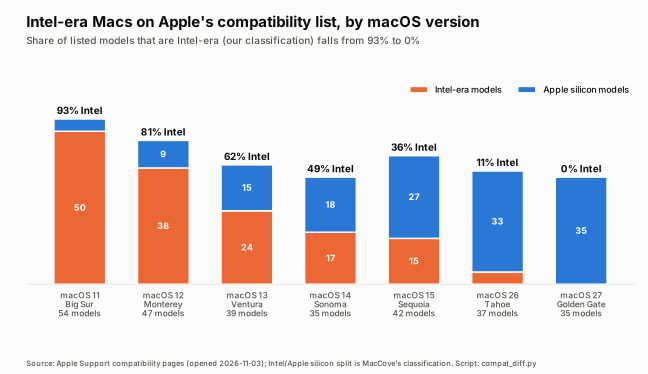
Apple publishes one compatibility list per macOS version. The share of Intel-era models on those lists falls from 93% on macOS 11 to 0% on macOS 27.
| macOS | Models listed | Apple silicon | Intel-era | Intel-era share |
|---|---|---|---|---|
| 27 Golden Gate | 35 | 35 | 0 | 0% |
| 26 Tahoe | 37 | 33 | 4 | 11% |
| 15 Sequoia | 42 | 27 | 15 | 36% |
| 14 Sonoma | 35 | 18 | 17 | 49% |
| 13 Ventura | 39 | 15 | 24 | 62% |
| 12 Monterey | 47 | 9 | 38 | 81% |
| 11 Big Sur | 54 | 4 | 50 | 93% |
We copied Apple's seven compatibility lists as published (pages opened November 3, 2026) and counted the models. Apple's pages do not label chips, so the Apple silicon versus Intel-era split is our own classification by chip generation: M-series and A-series Macs count as Apple silicon and every other model as Intel-era. Counts include each size and port variant that Apple lists separately.
What changed from each version to the next
Each step dropped between 2 and 14 models. The macOS 26 to macOS 27 step removed four Intel Macs: 2019 16-inch MacBook Pro, 2020 13-inch MacBook Pro (four ports), 2020 27-inch iMac, 2019 Mac Pro.
| Step | Dropped | Added | Notable drops |
|---|---|---|---|
| 11 to 12 | 12 | 5 | 2013 and 2014 MacBook Pro and MacBook Air, 2014 and 2015 iMac |
| 12 to 13 | 14 | 6 | 2015 and 2016 MacBook Pro, Late 2015 iMac, Mac mini (Late 2014), Mac Pro (Late 2013) |
| 13 to 14 | 7 | 3 | 2017 MacBook Pro, MacBook (12-inch) and iMac |
| 14 to 15 | 2 (Apple's lists differ by 3, see note) | 10 | MacBook Air (Retina) 2018 and 2019 |
| 15 to 26 | 11 | 6 | 2018 and 2019 MacBook Pro, 2020 MacBook Air (Intel), 2019 iMac, iMac Pro (2017), Mac mini (2018) |
| 26 to 27 | 4 | 2 | MacBook Pro 16-inch (2019), MacBook Pro 13-inch (2020, four ports), iMac 27-inch (2020), Mac Pro (2019) |
A direct comparison of Apple's Sonoma and Sequoia lists counts three drops, but one is a relabel. The Sonoma list has iMac (24-inch, 2023), and the Sequoia list shows the same size and year as separate Four ports and Two ports entries. Only two Macs actually lost support at that step: the 2018 and 2019 Retina MacBook Air.
The Intel cutoff
Apple's macOS 27 list contains only Apple silicon Macs, and Apple says macOS 27 runs on any Apple silicon Mac. macOS 26 Tahoe is therefore the last macOS Apple lists for Intel Macs.
For the full model-by-model list, see Can my Mac run macOS 27 Golden Gate?
Is my macOS version still supported?
Apple publishes no fixed support period for macOS. On its security-releases page dated October 30, 2026, the newest macOS entries are 27.2, 26.7.2 and 15.8.2 (all October 26, 2026) and 14.8.9 (August 6, 2026).
| macOS | Latest version (Apple) | Newest security release listed by Apple |
|---|---|---|
| 27 Golden Gate | 27.2 | Oct 26, 2026 |
| 26 Tahoe | 26.7.2 | Oct 26, 2026 |
| 15 Sequoia | 15.8.2 | Oct 26, 2026 |
| 14 Sonoma | 14.8.9 | Aug 6, 2026 |
| 13 Ventura | 13.7.8 | Not among the newest entries on the page |
| 12 Monterey | 12.7.6 | Not among the newest entries on the page |
| 11 Big Sur | 11.7.11 | Not among the newest entries on the page |
Apple's page does not state that a version is or is not supported. It lists releases that carry security content. A version missing from the newest entries is a reason to check Apple's full security-releases archive, not proof that the version is unsupported.
What our own installs show
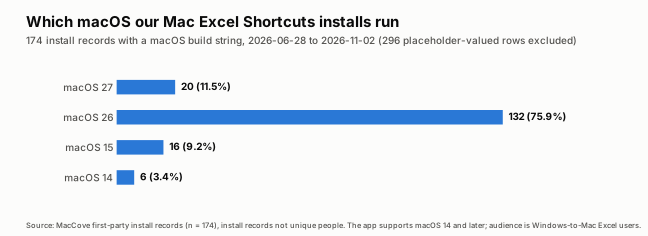
On a sample of 174 Mac Excel Shortcuts App installs with a recorded macOS build between June 28 and November 2, 2026, 76% ran macOS 26 Tahoe and 11.5% ran macOS 27. We dont support OS before Sonoma for Mac Excel Shortcuts app, so those numbers are not part of our distribution.
| macOS | Installs | Share | Intel Macs among them |
|---|---|---|---|
| 27 Golden Gate | 20 | 11.5% | 0 |
| 26 Tahoe | 132 | 75.9% | 2 |
| 15 Sequoia | 16 | 9.2% | 5 |
| 14 Sonoma | 6 | 3.4% | 2 |
| Total | 174 | 100% | 9 |
These are install records sample from our own database, not unique people, it could be that there are repeat installers in this sample, as we don't collect emails or other contact information post installation. The sample is Windows-to-Mac Excel users who chose to install our app, so it does not describe Mac owners in general.
Nine of the 174 installs, 5.2%, were Intel Macs, and none of those nine were on macOS 27, which matches Apple's list.
How we checked
Every version, date and model in this guide comes from an Apple page opened on November 3, 2026, except the Big Sur release date. We did not install any macOS version to write it.
From Apple we used the compatibility pages for macOS 27, 26, 15, 14, 13, 12 and 11, the table of macOS versions, the security-releases page, the macOS 27 upgrade page and the Newsroom announcements for Monterey through macOS 26. The counts, the Intel split, the step-by-step comparison and the install figures are ours. We did not check whether Apple has a formal support policy beyond what its pages state.
What to do with your Mac
Find your Mac model in the tables, then install the newest macOS Apple lists for it after a backup. MacCove Space needs macOS 12 or later, so macOS 11 Macs cannot run it.
If your Mac is on Apple's macOS 27 list, back it up and update through System Settings, General, Software Update. Details are in Can my Mac run macOS 27 Golden Gate?
If your Mac is a 2019 16-inch MacBook Pro, a 2020 13-inch MacBook Pro (four ports), a 2020 27-inch iMac or a 2019 Mac Pro, macOS 26 Tahoe (latest 26.7.2) is the newest Apple lists for it.
If your Mac is older, use the oldest-Macs column in the first table to find the newest macOS Apple lists for it.
If you are short on disk space, note that Apple's upgrade page states no free-space requirement. Our Space blog guides on a full Mac and on a huge System Data folder are the place to start.
FAQs
What is the latest version of macOS?
macOS 27 Golden Gate, released September 14, 2026. Apple's table of macOS versions, dated October 26, 2026, lists 27.2 as its latest version.
Is there a macOS 16 to 25?
No. Apple's table goes from macOS Sequoia 15 straight to macOS Tahoe 26. macOS Tahoe 26 was released in September 2025 and macOS 27 Golden Gate followed in September 2026.
Which macOS can my Intel Mac run?
It depends on the model. Apple's macOS 27 list contains no Intel Macs. The 2019 16-inch MacBook Pro, 2020 13-inch MacBook Pro (four ports), 2020 27-inch iMac and 2019 Mac Pro top out at macOS 26 Tahoe. For other Intel Macs, use the step-by-step table above.
How long does Apple support each macOS?
Apple does not publish a fixed period. Its security-releases page dated October 30, 2026 lists updates for macOS 27.2, 26.7.2 and 15.8.2 on October 26, 2026 and for macOS 14.8.9 on August 6, 2026.
Does a macOS upgrade cost money?
Apple's newsroom announcements describe macOS Monterey, Ventura, Sonoma, Sequoia and macOS 26 as free software updates.
Related guides
Can my Mac run macOS 27 Golden Gate?: Apple's full model list and the four Intel Macs it dropped.
Windows keyboard on Mac: where every key went: for people switching from Windows.
References
Apple Support, Find out which macOS your Mac is using, page dated October 26, 2026. Accessed November 3, 2026.
Apple Support, Apple security releases, page dated October 30, 2026. Accessed November 3, 2026.
Apple Support, macOS 27 Golden Gate is compatible with these computers, September 14, 2026.
Apple Support, How to upgrade to macOS 27 Golden Gate, September 14, 2026.
Apple Support, macOS Tahoe 26 compatibility, macOS Sequoia, macOS Sonoma, macOS Ventura (archived by Apple), macOS Monterey and macOS Big Sur. Accessed November 3, 2026.
Apple Newsroom, New versions of Apple's software platforms are available today (September 15, 2025), macOS Sequoia is available today (September 16, 2024), macOS Sonoma is available today (September 26, 2023), macOS Ventura is now available (October 24, 2022) and macOS Monterey is now available (October 25, 2021).
9to5Mac, macOS 11 Big Sur launching on November 12, November 10, 2020 (secondary source for the Big Sur date).
Apple Support, Find your Mac model name and serial number, page dated October 26, 2026.