Can My Mac Run macOS 27 Golden Gate? Apple's Full List, Model by Model
Macs that can run macOS 27 Golden Gate
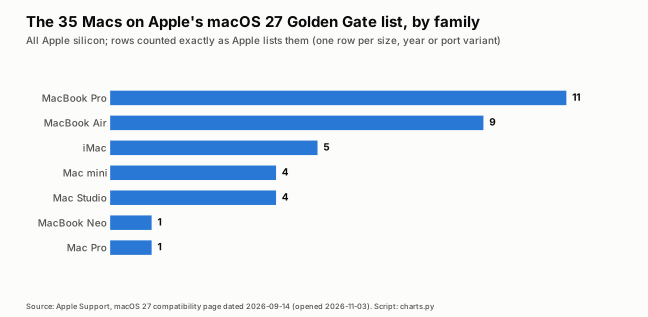
Apple's macOS 27 list has 35 models across MacBook Pro, MacBook Air, MacBook Neo, iMac, Mac mini, Mac Studio and Mac Pro, all Apple silicon. The oldest are M1 Macs from 2020 and 2021.
| Family | Model, as Apple lists it |
|---|---|
| MacBook Pro | 16-inch, M5 Pro or M5 Max |
| MacBook Pro | 14-inch, M5 Pro or M5 Max |
| MacBook Pro | 14-inch, M5 |
| MacBook Pro | 16-inch, 2024 |
| MacBook Pro | 14-inch, 2024 |
| MacBook Pro | 16-inch, 2023 |
| MacBook Pro | 14-inch, 2023 |
| MacBook Pro | 13-inch, M2, 2022 |
| MacBook Pro | 16-inch, 2021 |
| MacBook Pro | 14-inch, 2021 |
| MacBook Pro | 13-inch, M1, 2020 |
| MacBook Air | 15-inch, M5 |
| MacBook Air | 13-inch, M5 |
| MacBook Air | 15-inch, M4, 2025 |
| MacBook Air | 13-inch, M4, 2025 |
| MacBook Air | 15-inch, M3, 2024 |
| MacBook Air | 13-inch, M3, 2024 |
| MacBook Air | 15-inch, M2, 2023 |
| MacBook Air | M2, 2022 |
| MacBook Air | M1, 2020 |
| MacBook Neo | 13-inch, A18 Pro |
| iMac | 24-inch, 2024, Four ports |
| iMac | 24-inch, 2024, Two ports |
| iMac | 24-inch, 2023, Four ports |
| iMac | 24-inch, 2023, Two ports |
| iMac | 24-inch, M1, 2021 |
| Mac mini | M6 or M5 Pro |
| Mac mini | 2024 |
| Mac mini | 2023 |
| Mac mini | M1, 2020 |
| Mac Studio | M5 Max or M5 Ultra |
| Mac Studio | 2025 |
| Mac Studio | 2023 |
| Mac Studio | 2022 |
| Mac Pro | 2023 |
Entries are copied as Apple published them on its macOS 27 compatibility page, dated September 14, 2026 (opened November 3, 2026). The Mac mini and Mac Studio rows that name chips instead of years are Apple's own wording.
Macs that ran macOS 26 Tahoe but cannot run macOS 27
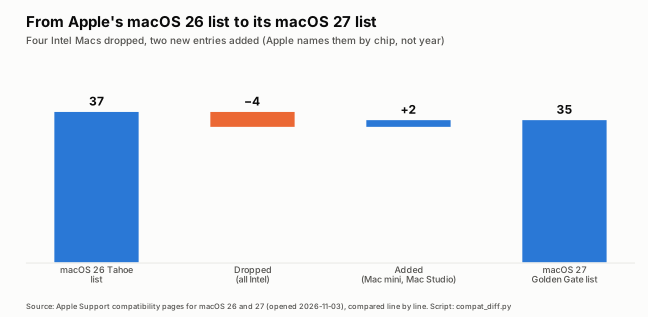
Four Macs on Apple's macOS 26 Tahoe list are missing from the macOS 27 list: the 2019 16-inch MacBook Pro, 2020 13-inch MacBook Pro (four ports), 2020 27-inch iMac and 2019 Mac Pro.
| Model, as Apple lists it | Newest macOS Apple lists for it |
|---|---|
| MacBook Pro (16-inch, 2019) | macOS 26 Tahoe (latest 26.7.2) |
| MacBook Pro (13-inch, 2020, Four Thunderbolt 3 ports) | macOS 26 Tahoe (latest 26.7.2) |
| iMac (Retina 5K, 27-inch, 2020) | macOS 26 Tahoe (latest 26.7.2) |
| Mac Pro (2019) | macOS 26 Tahoe (latest 26.7.2) |
We found these four by comparing Apple's two lists line by line, because Apple's macOS 27 page does not call them out. Apple's upgrade page states that macOS 27 runs on any Mac with an Apple silicon chip. These four models have Intel processors, which is our classification, since Apple's pages do not label chips.
The latest macOS Tahoe 26 version in Apple's table of macOS versions, dated October 26, 2026, is 26.7.2, and Apple's security-releases page lists macOS Tahoe 26.7.2 on October 26, 2026.
How to check which Mac you have
Click the Apple menu in the top-left corner, choose About This Mac, and read the model name below the picture of your Mac. Apple says the same window shows the serial number.
Apple lists Macs by size, year and chip, so match all three against the table above. If your model name does not appear in the macOS 27 table, it is not on Apple's macOS 27 list.
If your Mac is supported: before you update
Apple recommends backing up first and then updating from System Settings: Apple menu, System Settings, General, Software Update. Apple's upgrade page lists no free-space requirement, so check your own free space before you start.
Back up your Mac, as Apple recommends before any macOS upgrade.
Choose Apple menu, then System Settings, click General in the sidebar, then click Software Update.
If macOS 27 is available for your model, click the button to update, upgrade or restart, in Apple's wording.
Apple gives no storage figure for this upgrade and we did not measure one for this guide. If your Mac is nearly full, our Space blog guides on a full Mac and on a huge System Data folder cover where the space usually goes. MacCove Space, our Mac storage app, supports macOS 12 through macOS 27.
If your Mac is not on the list
Apple says a Mac that isn't compatible might be able to install an earlier macOS instead. Which version depends on the model; the versions guide lists the oldest Macs Apple supports for each macOS.
See macOS versions in order for the newest macOS Apple lists for older Macs. MacCove Space needs macOS 12 or later, so it runs on any Mac whose newest macOS is Monterey 12 or newer.
Quirks in Apple's list
Two rows on Apple's macOS 27 page name chips instead of years, and Apple's iMac rows changed format between macOS 14 and 15, so check a copied Apple list before comparing versions.
Apple's macOS 27 page names the Mac mini as M6 or M5 Pro and the Mac Studio as M5 Max or M5 Ultra, next to year-based rows for older models. The macOS Tahoe 26 list has 37 entries and the macOS 27 list has 35: four dropped, two added.
FAQs
Can a 2019 MacBook Pro run macOS 27?
No. The 16-inch 2019 MacBook Pro is on Apple's macOS 26 Tahoe list but not on the macOS 27 list, and the 2019 13-inch and 15-inch models were already missing from the Tahoe list.
Can a 2020 MacBook Air run macOS 27?
Only the M1 model. Apple lists MacBook Air (M1, 2020) for macOS 27. The Intel MacBook Air (Retina, 13-inch, 2020) dropped off at macOS 26 Tahoe.
Does macOS 27 run on any Intel Mac?
No. Apple's upgrade page says macOS 27 runs on any Mac with an Apple silicon chip, and none of the 35 models on its compatibility list is an Intel Mac.
Is my iMac supported?
The 24-inch iMacs from 2021 (M1), 2023 and 2024 are on Apple's list. The 2020 27-inch iMac is not; it was on the macOS 26 Tahoe list.
Will MacCove Space run on macOS 27?
Yes. MacCove Space supports macOS 12 through macOS 27.
Related guides
macOS versions in order: every release from Big Sur 11 to Golden Gate 27, with dates and supported Macs.
Your Mac is full: where the space goes: Space blog guide on a full Mac.
References
Apple Support, macOS 27 Golden Gate is compatible with these computers, September 14, 2026. Accessed November 3, 2026.
Apple Support, How to upgrade to macOS 27 Golden Gate, September 14, 2026. Accessed November 3, 2026.
Apple Support, macOS Tahoe 26 is compatible with these computers, September 14, 2026. Accessed November 3, 2026.
Apple Support, Find out which macOS your Mac is using, October 26, 2026. Accessed November 3, 2026.
Apple Support, Apple security releases, October 30, 2026. Accessed November 3, 2026.
Apple Support, Find your Mac model name and serial number, October 26, 2026. Accessed November 3, 2026.