Copy and Paste Not Working on a Mac? Fixes in Order, Easiest First
Copy and paste failures on a Mac come from three places: the app, the clipboard system, or a shortcut conflict. The steps below run from the quickest check to the most disruptive, so work down the list.
Is copy and paste blocked in this one app?
Open the Edit menu in the app. If Copy or Paste is greyed out, the app is blocking the action, and no shortcut will override it. Apple says each app decides what it allows.
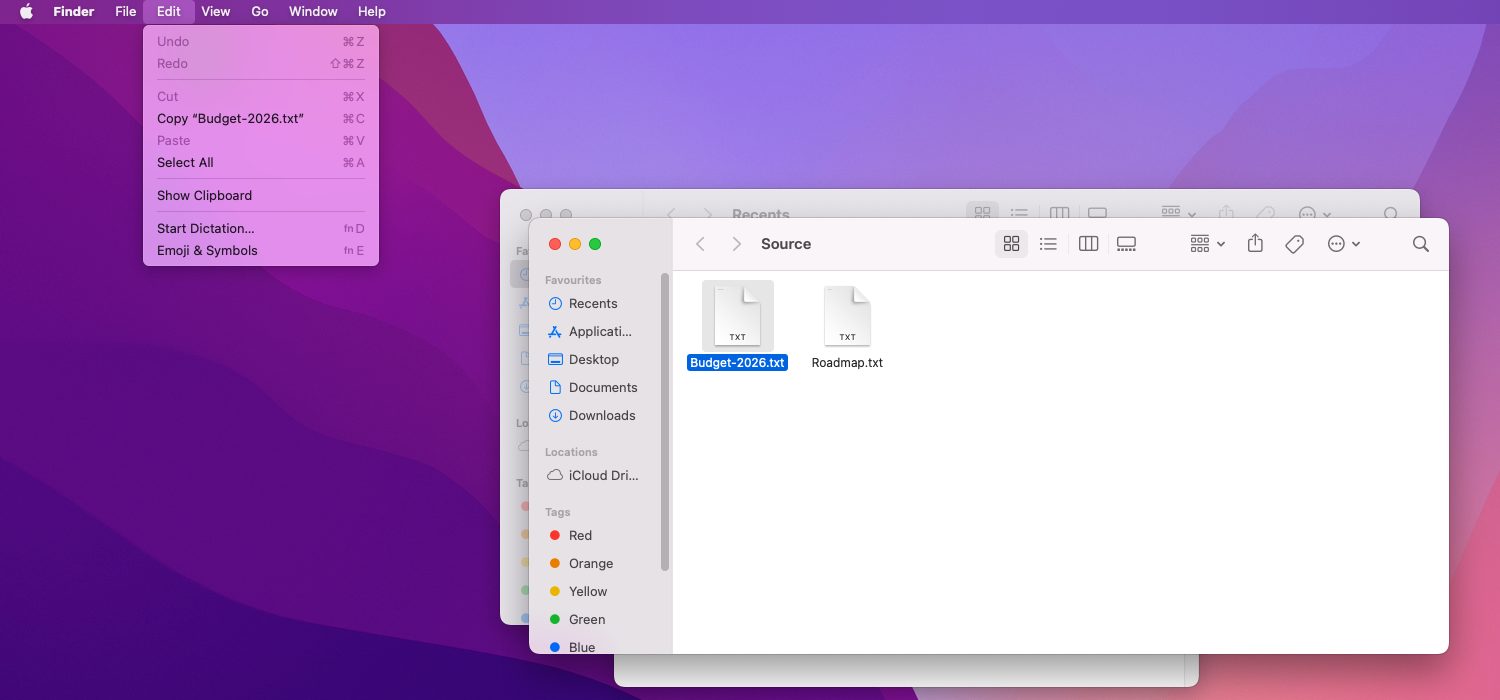
Protected files cause the same symptom: Microsoft describes Protected View in Office as a read-only mode where most editing functions are disabled. Read-only pages and locked fields also refuse paste.
Does the problem affect every app or only one?
Test in a plain app such as Notes or TextEdit. If copy and paste work there, the clipboard is healthy and the failing app needs a restart, an update or a settings check.
If every app fails, the problem sits in the clipboard system or the keyboard. The next sections cover both.
Is the Command key or keyboard the problem?
Try the Edit menu instead of Command+C and Command+V. If the menu works, the shortcut is the problem, from a stuck key, a remapped modifier or a keyboard-shortcut override.
Check System Settings, Keyboard, Keyboard Shortcuts, then App Shortcuts, for a custom entry on Copy or Paste. On a Windows keyboard, confirm the modifier mapping, as Cut and Paste Files on a Mac With a Windows Keyboard explains.
How do you restart the clipboard process on a Mac?
Quit and reopen the app, restart the Mac, and if the fault remains, restart the clipboard background process, pboard. Third-party guides recommend the Terminal command killall pboard, and macOS relaunches the process.
Reset the clipboard process
- Save and close important documents.
- Open Terminal from Applications, Utilities.
- Type killall pboard and press Return.
- Copy and paste a short line of text in Notes to test.
- If nothing changes, restart the Mac.
Do remote sessions or virtual machines block the clipboard?
Remote desktop apps and virtual machines keep their own clipboard-sharing settings. If paste fails only inside one of them, check that app’s clipboard or shared-clipboard option.
The setting is usually under the connection’s preferences, with a name such as Share Clipboard. Turning it off breaks copying between the Mac and the remote session.
Is Universal Clipboard replacing what was copied?
Copy on an iPhone and the Mac can receive that item in place of the one just copied. Apple says copied content stays on the other device until anything new is copied on either.
Turn off Handoff or sign out of the Apple Account on one device to test whether Universal Clipboard is the cause. Apple lists the requirements in its Universal Clipboard guide.
Could a macOS or app update fix it?
Install pending macOS and app updates, then restart the Mac. Updates can include clipboard fixes, and a fresh restart rules out a process that has been running since before the update.
If the fault began right after an update and survives a restart, test in Safe Mode and with a new user account to decide whether a login item, a utility or a profile causes it.
FAQs
Why did copy and paste stop working on my Mac?
Common causes are an app that blocks the action, a stuck or remapped key, a hung clipboard process, or a remote session. Test in Notes first; that single check separates app faults from system faults.
Is killall pboard safe?
The command only asks macOS to relaunch the clipboard process, and guides describe it as routine. Apple does not document it, so save open work first and restart the Mac if anything looks wrong.
Why does paste work in some apps but not others?
Each app decides what it allows, so an app can refuse paste while the clipboard works fine elsewhere. Protected View, read-only pages and locked fields are the usual reasons.
Why does the clipboard change by itself?
Universal Clipboard can bring an item copied on a nearby iPhone or iPad onto the Mac. Clipboard managers and remote sessions can also rewrite the clipboard after a copy.
Related guides
Command+X Not Working on Mac? Why It Doesn’t Cut Files and Other Fixes
How to Copy, Cut and Paste on Mac: Every Shortcut and Method