Best Mac Cleaner for an Old MacBook: Which Apps Still Run on Your macOS?
Quick answer: On macOS 12 or later, MacCove Space App is the smallest all-in-one cleaner we compared: a 5.5 MB download and 12 MB installed, against 320 MB for CleanMyMac on MacPaw's site. If your MacBook stops at macOS 11 or older, Space will not run; use DaisyDisk or OnyX instead.
Disclosure and method: we make Space. Competitor figures come from each vendor's own site or the Mac App Store, opened on November 3, 2026. Space's size and minimum macOS come from our own measurement of the shipped 1.0.17 build. We did not install the other apps or measure their installed size.
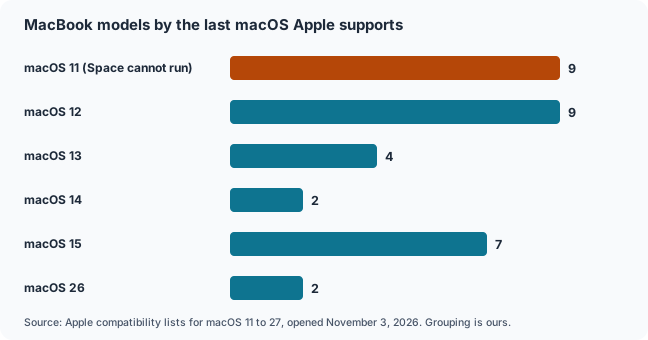
Which old MacBooks stop at which macOS?
Apple's lists show 9 MacBook models stopping at macOS 11, 9 at macOS 12 and 4 at macOS 13. Space needs macOS 12 or later, so models stopping at macOS 11 cannot run it.
| Last macOS Apple supports | MacBook models stopping there (Apple lists, our grouping) | Count | Can run Space? |
|---|---|---|---|
| macOS 11 Big Sur | MacBook Pro Retina 13 and 15-inch (Late 2013, Mid 2014); MacBook Air 11 and 13-inch (Mid 2013, Early 2014); MacBook 12-inch Early 2015 | 9 | No |
| macOS 12 Monterey | MacBook Pro 13-inch Early 2015 and 15-inch Mid 2015; MacBook Pro 2016 (three models); MacBook Air Early 2015 (11 and 13-inch) and 2017; MacBook 12-inch Early 2016 | 9 | Yes, at its minimum |
| macOS 13 Ventura | MacBook Pro 2017 (three models); MacBook 12-inch 2017 | 4 | Yes |
| macOS 14 Sonoma | MacBook Air Retina 13-inch 2018 and 2019 | 2 | Yes |
| macOS 15 Sequoia | MacBook Pro 2018 (two models), 2019 (three models) and 2020 (two-port 13-inch); MacBook Air Retina 2020 | 7 | Yes |
| macOS 26 Tahoe | MacBook Pro 13-inch 2020 (four ports); MacBook Pro 16-inch 2019 | 2 | Yes |
The lists only go back to macOS 11, so MacBooks older than the 2013 models are not covered here. For every supported model, see our macOS versions guide.
Why do old MacBooks need a different cleaner?
Old MacBooks combine small storage, little memory and an older macOS. Apple's page for the 2015 MacBook Air lists 128 GB storage and 4 GB memory options, so app size and requirements matter.
A cleaner that needs a recent macOS is no use on a MacBook that cannot update, and a large one takes space from the SSD you are trying to free. Cleaning also does not change which macOS your Mac can run.
Which Mac cleaners still run on an older macOS?
CleanMyMac needs macOS 11, DaisyDisk macOS 10.13, AppCleaner 3.6.8 macOS 10.14, and Space macOS 12. OnyX ships a separate version for each macOS release back to 10.2.
| App | Minimum macOS | Download size | Source |
|---|---|---|---|
| Space | macOS 12.0 | 5.5 MB download; 12 MB installed (version 1.0.17, universal Intel and Apple silicon) | Our measurement of the shipped build |
| CleanMyMac | macOS 11 | 320 MB on MacPaw's site; 166.1 MB on the Mac App Store | MacPaw and Mac App Store, November 3, 2026 |
| DaisyDisk | macOS 10.13 | Not listed | DaisyDisk site |
| OnyX | A separate version for each macOS back to 10.2 | 4.9 MB for Big Sur, 5.6 MB for Monterey | Titanium Software site |
| AppCleaner | Version 3.6.8 runs on macOS 10.14 to 15.6; 3.7 needs macOS 15 | Not listed | FreeMacSoft site |
How big is each cleaner app?
Space is a 5.5 MB download and 12 MB installed in our measurement of version 1.0.17. CleanMyMac lists 320 MB on MacPaw's site and 166.1 MB on the Mac App Store.
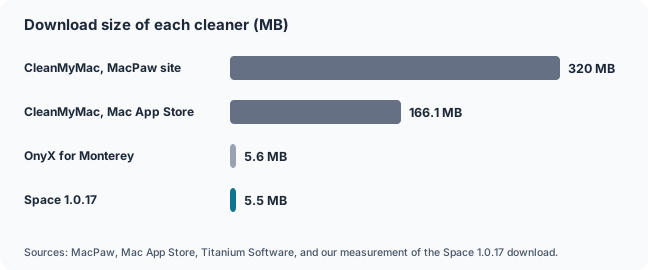
For scale, 320 MB is about 0.25 percent of a 128 GB SSD, so the size difference matters most on the smallest drives or when you install several tools. Download size is not the same as installed size, and we did not measure CleanMyMac after installing it. The Space figure is for the direct-download build; the Mac App Store build was not measured.
How is Space so much smaller than CleanMyMac?
Space is small because it is a native Swift app built on macOS's own frameworks, with one third-party library and no large databases: about 12 MB installed, 8.2 MB of it app code.
Component sizes below come from our 1.0.18 export, inspected on November 3, 2026; the 5.5 MB download figure earlier is from the shipped 1.0.17 build.
| Part | Size | What it is |
| App code | 8.2 MB | One universal binary: Intel (x86_64, about 4.1 MB) and Apple silicon (arm64, about 4.0 MB) code |
| Sparkle update framework | 2.7 MB | The only third-party library; handles Space's own updates |
| Resources | 0.5 MB | App icon, images and two small JSON lists (4.2 KB and 0.9 KB) |
| Helper tool (space-mcp) | 0.6 MB | Command-line server that lets an AI assistant read scan results |
| Finder extension | 0.2 MB | A Finder Sync extension |
| Total | 12.2 MB | Measured with du on the 1.0.18 export, November 3, 2026 |
The app target is 114 Swift files and about 22,000 lines, and 65 of those files use SwiftUI, Apple's own interface framework. The Frameworks folder holds only Sparkle, so no web engine, cross-platform runtime or copy of the Swift runtime is bundled.
The universal binary carries two copies of the code, one per chip. A single-architecture build would drop roughly 4 MB, but Space ships both so Intel MacBooks keep working; we have not measured a single-architecture build.
What does a 12 MB cleaner leave out compared with CleanMyMac?
Space covers storage cleanup, exact duplicates, leftovers, startup items, memory and a small adware check, but not CleanMyMac's updater, similar-photo finder or cloud storage cleanup, and its malware check is a short denylist.
CleanMyMac's column comes from MacPaw's product page, opened November 3, 2026; Space's column comes from our own source code and build.
| Capability | CleanMyMac (MacPaw page) | Space 1.0.18 (our source) |
| Storage cleanup | Free up space: clears hidden system junk and outdated files | Scans by category rules, then cleans to the Trash with undo |
| Duplicates | Clutter finder: duplicate and similar photos, plus large and forgotten files | Exact byte-identical files only (SHA-256 match); similar-image detection is not shipped |
| Uninstalling apps | Uninstaller removes apps with their leftover data | Leftover detection in every build; deleting the app itself is in the direct-download build only |
| Malware | Protection finds and removes malware hidden in harmless-looking software | Offline denylist of adware families: 8 bundle IDs, 8 labels, 5 path patterns, 8 hijack domains; reads only |
| Performance | Controls memory and CPU load for demanding tasks | Flags startup items and background helpers; Release Memory quits apps you pick (quitting needs Pro) |
| Software updates | Updater updates installed software | Not offered |
| Cloud storage | Cloud storage cleanup shows large cloud files and local copies | Not offered |
| Other | Smart Care runs five tasks in one pass | Menu-bar storage readout, duplicate-arrival alerts, sunburst disk map, MCP server for AI deep dives |
The MacPaw page lists fewer modules than the CleanMyMac app may offer, so a feature missing from that page is not proof that the product lacks it. We have not run the two apps side by side, so this is a feature comparison, not a performance test.
The size gap therefore comes with trade-offs. A short denylist cannot match a large malware database, and exact-duplicate matching misses re-saved or resized photos. Where Space does the same job, native code and system frameworks help explain the difference in size.
Which cleaner is best for your old MacBook?
The answer depends on your macOS. Below macOS 12, use DaisyDisk, OnyX or CleanMyMac. On macOS 12 or later with a small SSD, Space is the lightest all-in-one option compared here.
| Your situation | Start with | Why |
|---|---|---|
| MacBook stops at macOS 11 or older | DaisyDisk or OnyX (the version for your macOS) | Both list older systems; Space needs macOS 12 and CleanMyMac needs macOS 11 |
| macOS 12 or later, small SSD, want one app | Space | Smallest download and install in this comparison |
| You only need to see what fills the disk | DaisyDisk | A visual map of the disk |
| You want maintenance tools and know what they do | OnyX | A version for each macOS release |
| macOS 11 or later and you want a polished all-in-one | CleanMyMac | Broad feature set; much larger download |
For a broader comparison of cleaners on any Mac, see CleanMyMac Alternatives: CleanMyMac vs OnyX vs CCleaner vs DaisyDisk vs AppCleaner.
What can you do without any cleaner on an old MacBook?
Apple's own advice is to use Storage settings, empty the Trash, delete old downloads and iPhone backups, and move media elsewhere. These steps need no extra app and cost nothing.
Our practical checklist walks through them, and how to find large files shows where the space went. If the Mac is slow rather than full, see why your Mac is running slow.
How do you check which macOS your old MacBook can run?
Open the Apple menu and choose About This Mac to see your model and year, then match it against Apple's compatibility list for each macOS. Our macOS versions guide lists every supported model.
Start with macOS versions in order and, for the newest release, can my Mac run macOS 27.
FAQs
What is the best Mac cleaner for an old MacBook?
For macOS 12 or later with a small SSD, Space is the lightest all-in-one app in our comparison, and we make it. Below macOS 12, use DaisyDisk or OnyX, which support older systems.
Does Space work on macOS 11 or older?
No. Space's minimum is macOS 12.0, so the MacBooks that stop at macOS 11, such as the 2013 and 2014 MacBook Air and Pro models, cannot run it. Use DaisyDisk or OnyX there.
Does Space run on Intel MacBooks?
Yes. The Space 1.0.17 direct-download build is a universal binary containing both Intel and Apple silicon code, and its minimum macOS is 12.0. We have not tested every Intel model.
Is Space smaller than CleanMyMac?
Yes. Space 1.0.17 is a 5.5 MB download that takes 12 MB installed in our measurement, while MacPaw lists CleanMyMac at 320 MB. We did not measure CleanMyMac's installed size.
Does CleanMyMac work on an old MacBook?
CleanMyMac requires macOS 11 or later per MacPaw, so MacBooks that stop at macOS 11 can use it. Older systems are outside its stated requirements.
Should I update my old MacBook instead of cleaning it?
Check Apple's compatibility list for the newest macOS your model supports, then back up and update through System Settings, General, Software Update. Cleaning does not change which macOS your Mac can run.
How is a 12 MB Mac cleaner built?
Space is written in Swift with SwiftUI and AppKit, relies on frameworks already inside macOS, bundles only the Sparkle updater, and ships two tiny data files instead of a large signature database.
Does Space do everything CleanMyMac does?
No. Space has no software updater, similar-photo finder or cloud storage cleanup, and its malware check is a short offline denylist. Space adds menu-bar monitoring, duplicate-arrival alerts and an AI deep-dive server.
Related guides
CleanMyMac Alternatives: CleanMyMac vs OnyX vs CCleaner vs DaisyDisk vs AppCleaner
OnyX for Mac: What It Does, Whether It Is Safe, and What to Use Instead
Mac Storage Full? A Complete Guide to Finding and Freeing Up Space
Sources
Apple: MacBook Air (13-inch, Early 2015) technical specifications
Space 1.0.18 export and source code (our own inspection, November 3, 2026)