What Are the Paste Special Shortcuts on Mac Excel?
Quick Answer: On Windows, Paste Special is
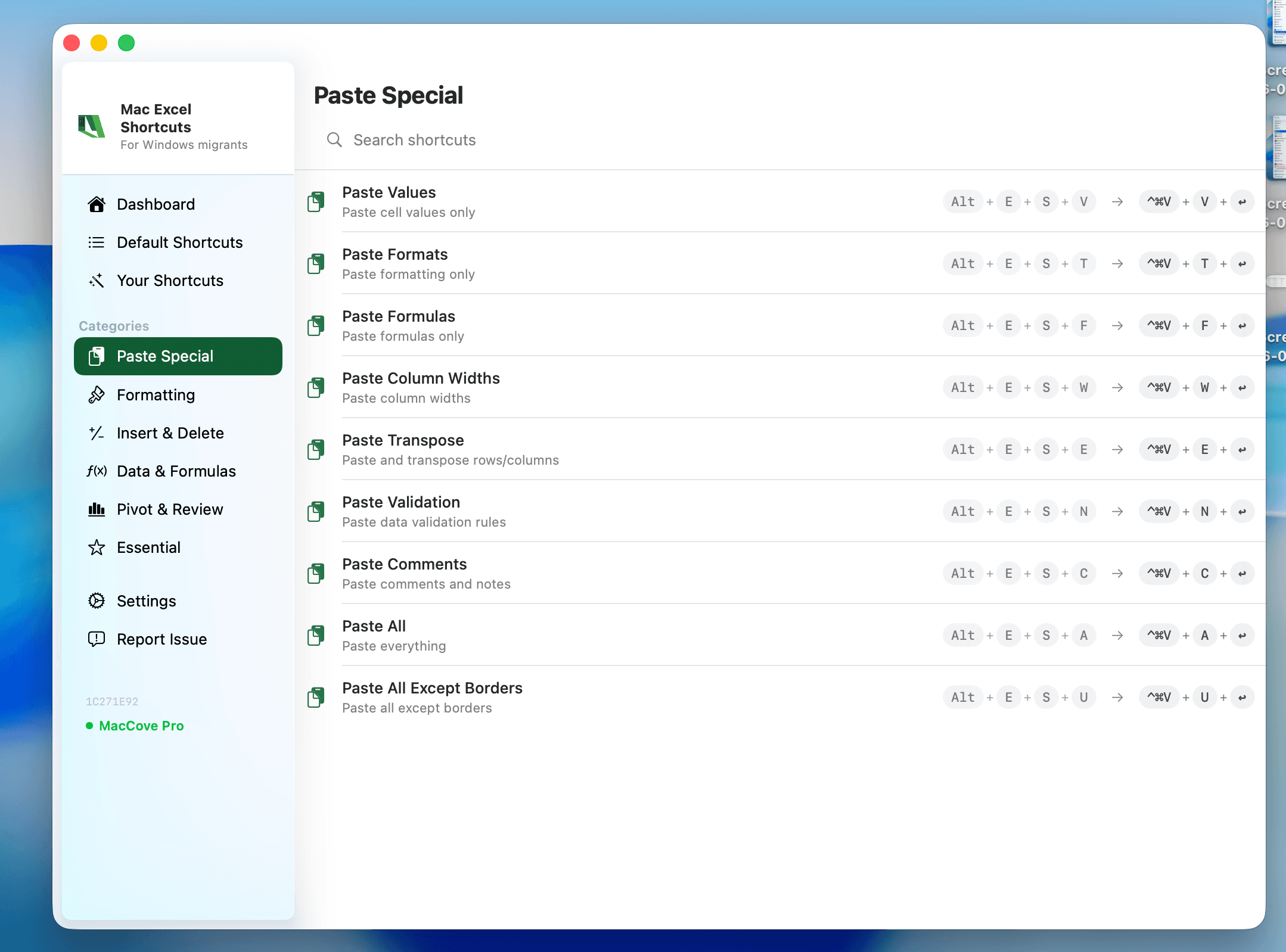
Ctrl+Alt+V(or the classicAlt+E+S). On Mac, it'sControl+Cmd+V— note that's the Control key plus Cmd, not Option/Alt plus Cmd. There's no single-keystroke shortcut for individual paste types on Mac by default — you open the Paste Special dialog withControl+Cmd+V, then use the on-screen options or arrow keys + Enter to pick the variant. Mac Excel Shortcuts app intercepts the Windows-style Alt+E+S+V keystroke and fires the correct Mac Paste Special action directly, skipping the dialog entirely.
User problem
Paste Special is one of the most-used commands in Excel, and one Windows users are most confident about, because Alt+E+S+V is burned into muscle memory. On Mac, that does nothing useful. The actual shortcut, Control+Cmd+V, isn't something most people would guess.
What this covers
Every Paste Special variant available in Mac Excel, its shortcut path, and its Windows equivalent.
Method 1: Ribbon
Home tab → Paste dropdown (the small arrow under the Paste icon) gives you the most common variants directly: Paste Values, Paste Formulas, Paste Formatting, and Transpose, each as its own icon with a live preview.
Method 2: Menus / dialog
Right-click a cell after copying → Paste Special... opens the full dialog with every option: Values, Formulas, Formats, Comments, Validation, All Except Borders, Transpose, and arithmetic operations. Functionally identical to the Windows dialog, just launched with a different shortcut.
Method 3: Native keyboard shortcuts
Open Paste Special dialog:
Control+Cmd+VRegular paste:
Cmd+VCopy:
Cmd+COnce the dialog is open, use arrow keys to move between radio buttons and
Returnto confirm — there's no dedicated single-key shortcut per variantTranspose during paste: open Paste Special (
Control+Cmd+V), check Transpose, thenReturn
Full shortcut/variant table
| Paste Type | How to Trigger on Mac | Windows Equivalent |
| Regular paste | Cmd+V | Ctrl+V |
| Open Paste Special dialog | Control+Cmd+V | Ctrl+Alt+V |
| Paste Values only | Paste dropdown (Home tab) → Values, or dialog → Values | Alt+E+S+V |
| Paste Formulas only | Paste dropdown → Formulas, or dialog → Formulas | Alt+E+S+F |
| Paste Formats only | Paste dropdown → Formatting, or dialog → Formats | Alt+E+S+T |
| Transpose (rows ↔ columns) | Paste Special dialog → check Transpose | Alt+E+S+E |
| Paste with Add/Subtract/Multiply/Divide | Paste Special dialog → Operation section | Alt+E+S then operation letter |
| Paste Comments/Notes only | Paste Special dialog → Comments | Alt+E+S+C |
| Paste Validation only | Paste Special dialog → Validation | Alt+E+S+N |
| Paste All Except Borders | Paste Special dialog → All Except Borders | Alt+E+S+X |
| Paste Column Widths | Paste Special dialog → Column Widths | Alt+E+S+W |
Why there's no per-variant keyboard shortcut on Mac
Windows' Alt+E+S sequence works because Windows lets any menu be navigated by underlined-letter keystrokes — Alt+E+S+V for Values-only paste is really four sequential single-key presses through a menu tree, not a true simultaneous shortcut. macOS doesn't have that accelerator-key menu system at all. That's why on Mac you open the dialog once (Control+Cmd+V) and pick the variant with the mouse or arrow keys.
Method 5: Maccove workflow
This is the single highest-friction shortcut gap for Windows migrators, and it's the one Mac Excel Shortcuts app is built to solve directly: type the Windows sequence you already know (Alt+E+S+V or Alt+E+S+T) and Mac Excel Shortcuts intercepts it and fires the correct Mac Paste Special action, including jumping straight to Values Only.
Real-world example
You've built a formula in one column to calculate variance, and you need to copy the results into a summary tab. Workflow: Cmd+C to copy the formula range, click the destination cell, Control+Cmd+V to open Paste Special, select Values, hit Return.
Common mistakes
Pressing
Cmd+Option+Vinstead ofControl+Cmd+V— Option and Control are easy to mix up.Expecting a one-key Values-only shortcut like old Windows muscle memory — use the Home tab Paste dropdown for a one-click version instead.
Forgetting to check Transpose before confirming.
FAQs
Can I create my own keyboard shortcut for Paste Values on Mac?
Yes — via System Settings → Keyboard → Keyboard Shortcuts → App Shortcuts, you can assign a custom key combination to any menu command, including "Paste Values" if it appears as an exact menu item name.
Is there a difference between "Paste Formats" and Format Painter?
Format Painter applies formatting live as you click/drag; Paste Special → Formats requires a prior copy and works on a fixed destination range.